

DNS records are the entries in your domain's zone that tell the internet where things live. They say which server hosts your website, which server takes your email, and who may send mail or issue SSL certificates for your name. Each record has a name, a type, a value and a TTL. This guide explains what DNS records are, what each common type does (A, AAAA, CNAME, MX, TXT, NS, SOA, PTR, CAA, SRV and wildcards), and how to look each one up yourself.
Key takeaways
- A DNS record is one line in your domain's zone, made of a name, a TTL, a type and a value.
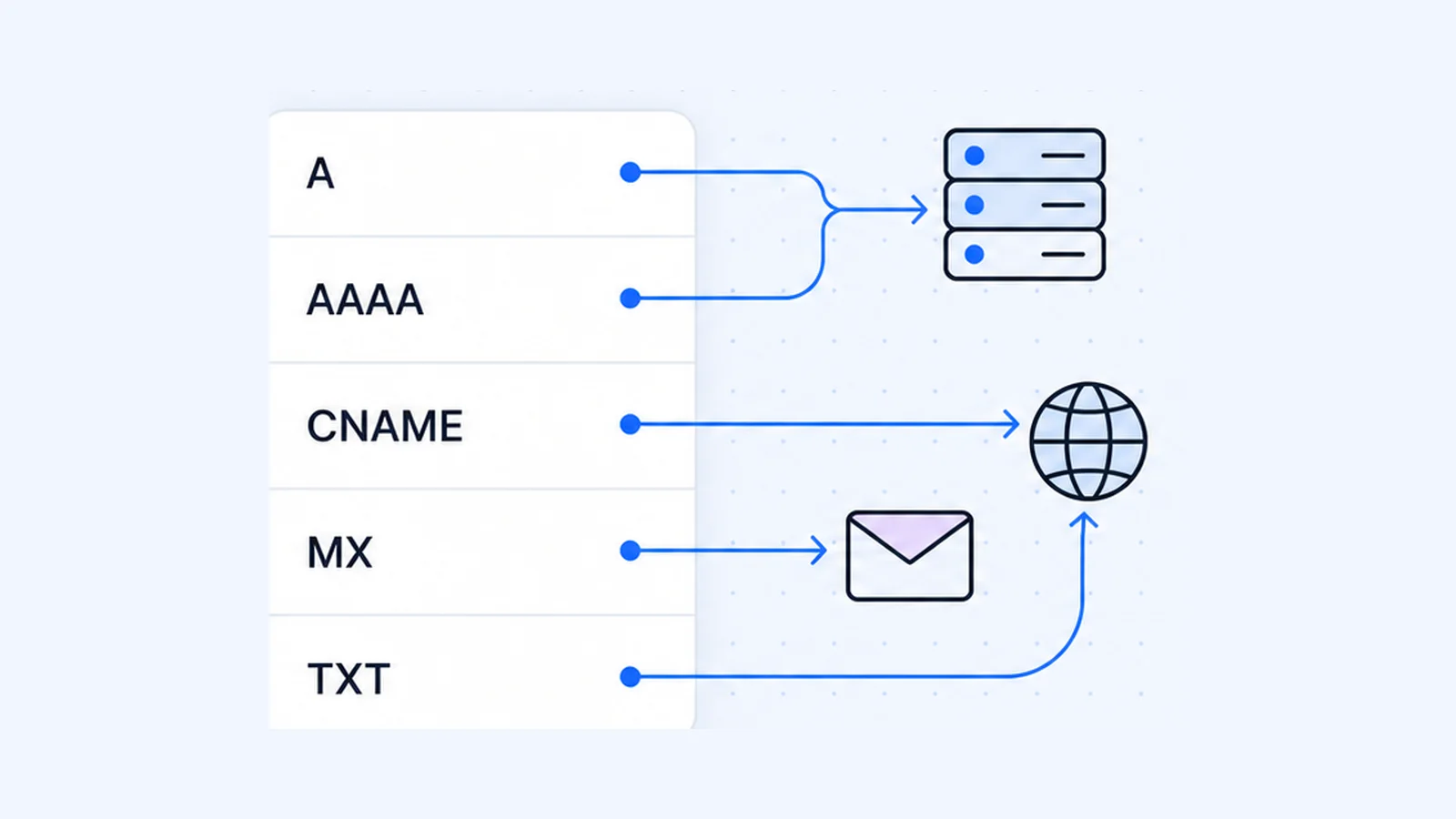
- A and AAAA records point a name at an IPv4 or IPv6 address. A CNAME makes a name an alias of another name. MX says where email goes. TXT holds SPF, DKIM, DMARC and verification strings.
- A CNAME can't share a name with any other record, so you can't put a plain CNAME on the bare domain (
example.com). - PTR (reverse DNS) records live in a separate reverse zone that the owner of the IP address controls. That is usually your host, and the record never sits in your domain's zone.
- You can check any record with
digon macOS or Linux,nslookupon Windows, or the free DNS lookup tool.
What are DNS records?
The DNS standard calls them resource records. Each one has an owner name, a type, a class, a TTL and type-specific data (RFC 1035, section 3.2.1). The TTL is the time, in seconds, that the record "may be cached before the source of the information should again be consulted."
Your domain's authoritative nameservers store the records. Your registrar points the world at those nameservers, and everyone gets the answers those servers hold. If you don't know which provider runs them, read what nameservers are first. Edits made anywhere else have no effect.
Here is one real record, the A record for example.com as returned on 1 October 2026:
example.com. 91 IN A 172.66.147.243From left to right, that is the name, the remaining TTL in seconds, the class (IN for internet), the type and the value.
DNS record types at a glance
| Record | What it does | Example value | Look it up |
|---|---|---|---|
| A | Points a name to an IPv4 address | 192.0.2.10 | dig A example.com |
| AAAA | Points a name to an IPv6 address | 2001:db8::10 | dig AAAA example.com |
| CNAME | Makes a name an alias of another name | example.com. | dig CNAME www.example.com |
| MX | Names the mail server(s) for a domain | 10 mail.example.com. | dig MX example.com |
| TXT | Holds text: SPF, DKIM, DMARC, verification | "v=spf1 mx -all" | dig TXT example.com |
| NS | Lists the domain's authoritative nameservers | ns1.example.com. | dig NS example.com |
| SOA | Zone settings: primary server, contact, serial, timers | ns1.example.com. hostmaster.example.com. ... | dig SOA example.com |
| PTR | Maps an IP address back to a name (reverse DNS) | mail.example.com. | dig -x 192.0.2.25 |
| CAA | Lists which certificate authorities may issue SSL | 0 issue "letsencrypt.org" | dig CAA example.com |
| SRV | Gives the host and port for a named service | 10 5 5061 sip.example.com. | dig SRV _sip._tls.example.com |
On Windows, swap dig TYPE name for nslookup -type=TYPE name. Microsoft documents the -type=<resourcerecordtype> option for this purpose (Microsoft Learn).
An example DNS zone
Here is how a small business domain's zone could look in the standard zone-file format. The addresses are example values.
$ORIGIN example.com.
$TTL 3600
@              IN  SOA   ns1.example.com. hostmaster.example.com. (
                         2026100101 ; serial
                         7200       ; refresh
                         3600       ; retry
                         1209600    ; expire
                         3600 )     ; minimum (negative-answer TTL)
@              IN  NS    ns1.example.com.
@              IN  NS    ns2.example.net.
ns1            IN  A     192.0.2.53
@              IN  A     192.0.2.10
@              IN  AAAA  2001:db8::10
www            IN  CNAME example.com.
@              IN  MX    10 mail.example.com.
mail           IN  A     192.0.2.25
@              IN  TXT   "v=spf1 mx -all"
s1._domainkey  IN  TXT   "v=DKIM1; k=rsa; p=MIIBIjANBgkqh...IDAQAB"
_dmarc         IN  TXT   "v=DMARC1; p=quarantine; rua=mailto:[email protected]"
@              IN  CAA   0 issue "letsencrypt.org"
_sip._tls      IN  SRV   10 5 5061 sip.example.com.
sip            IN  A     192.0.2.40
*              IN  A     192.0.2.10
@ means the domain itself. $TTL sets the default TTL for records that don't state one, and RFC 2308 added that directive. You rarely type a zone file by hand, because hosting control panels give you a form. cPanel's Zone Editor, for example, manages A, AAAA, CAA, CNAME, MX, SRV and TXT records among others (cPanel Docs). Every WaseerHost plan uses cPanel, so you'd edit records there if your domain uses your hosting nameservers (see the shared hosting plans).
IBM Technology's short video shows how zones and records fit together:
A and AAAA records
An A record maps a name to an IPv4 address. An AAAA record "stores a single IPv6 address", and IANA gives it type value 28 (RFC 3596). A host with several addresses has several records, and one name can have both types.
dig A example.com +short
dig AAAA example.com +short
On 1 October 2026 example.com returned two of each. The A answers were 172.66.147.243 and 104.20.23.154, and the AAAA answers were 2606:4700:10::ac42:93f3 and 2606:4700:10::6814:179a. On Windows, run:
nslookup -type=AAAA example.comAdd an AAAA record only if your server answers on that IPv6 address. Visitors who connect over IPv6 use it, so a wrong AAAA record can break the site for them while the A record still works for everyone else.
CNAME records (and the CNAME lookup)
A CNAME says "this name is an alias, and the real (canonical) name is over there." Resolvers then look up the target and return its records. The common uses are www pointing at the bare domain, or a subdomain pointing at a hosted service.
To do a CNAME lookup, run:
dig CNAME www.github.com +shortThat returned github.com. on 1 October 2026. On Windows, use nslookup -type=CNAME www.github.com.
The two CNAME rules people miss
- A CNAME can't sit next to other records. RFC 1034 says: "If a CNAME RR is present at a node, no other data should be present" (RFC 1034, section 3.6.2). RFC 2181 tightens this, and an alias name "may have no other data" apart from DNSSEC records (RFC 2181, section 10.1). So
blog.example.comcan be a CNAME, or it can have A, MX and TXT records, but not both. - You can't put a plain CNAME on the bare domain. The zone apex (
example.comitself) must hold the SOA and NS records, so a CNAME there breaks rule one. RFC 1912 shows this exact mistake and warns that the server will "refuse to add any other resources for that name" (RFC 1912, section 2.4). Some providers work around it. Cloudflare's CNAME flattening "allows you to use a CNAME record at your zone apex" by answering with the target's IP addresses instead (Cloudflare Docs). cPanel's ALIAS record does something similar, but cPanel's own docs call it experimental and "not RFC-compliant" and advise against it.
MX and NS records also must point at a real hostname, never at a CNAME. RFC 2181 says that name "must not be an alias" (section 10.3).
MX records
MX records tell other mail servers where to deliver email for your domain. Each one has a preference number and a mail server name, and "lower values are preferred" (RFC 1035, section 3.3.9). With two MX records at preferences 10 and 20, senders try 10 first and fall back to 20.
dig MX google.com +shortThat returned 10 smtp.google.com. on 1 October 2026. Run dig MX example.com +short and you get 0 ., a "null MX". RFC 7505 defines this record as the way to say a domain accepts no email at all.
Google Workspace and other email providers give you the exact MX values to enter. The guide to using Gmail with your own domain walks through the setup, and WaseerHost email covers mailboxes on your own domain.
TXT records: SPF, DKIM, DMARC and verification (DNS TXT lookup)
A TXT record holds text. RFC 1035 says TXT records "are used to hold descriptive text" (section 3.3.14), and other standards define what goes inside. You'll meet these four most often:
- SPF lists the servers that may send mail for your domain. It must be a TXT record (RFC 7208, section 3.1), and a domain "MUST NOT have multiple records" that a check would select, so merge your senders into one
v=spf1record. A record ending in-alltells receivers to fail anything not listed. - DKIM publishes the public key that verifies your mail's signatures. It lives at
selector._domainkey.yourdomain, and RFC 6376 gives the example of a query for "foo.bar._domainkey.example.com" (section 3.6.2.1). - DMARC tells receivers what to do with mail that fails the checks. It sits at
_dmarc.yourdomainand starts withv=DMARC1. The policyp=isnone,quarantineorreject(RFC 7489). - Verification strings prove to services such as search consoles and email providers that you control a domain. Add the exact string they give you. Leaving it in place does no harm.
To do a DNS TXT lookup, run:
dig TXT example.com +short
dig TXT _dmarc.google.com +short
On 1 October 2026 the first command returned "v=spf1 -all" (no server may send mail as example.com) plus a verification string. The second returned Google's DMARC policy, "v=DMARC1; p=reject; rua=mailto:[email protected]". On Windows, run:
nslookup -type=TXT _dmarc.google.comNS and SOA records
NS records name the servers that are authoritative for the zone. RFC 1035 defines an NS record as naming "a host which should be authoritative for the specified class and domain" (section 3.3.11). The outside world follows the NS records your registrar publishes, so you change nameservers at the registrar.
dig NS example.com +shortThe SOA record (start of authority) sits at the top of every zone. RFC 1035, section 3.3.13 defines its fields:
| Field | Meaning |
|---|---|
| MNAME | The primary source nameserver for the zone |
| RNAME | The administrator's mailbox, with the @ written as a dot |
| SERIAL | Version number of the zone; secondaries use it to spot changes |
| REFRESH, RETRY, EXPIRE | How often secondary servers check for updates, retry and give up (seconds) |
| MINIMUM | Today, the TTL for "this name doesn't exist" answers |
The MINIMUM field has a practical effect. RFC 2308 says resolvers cache a negative answer for the lower of the SOA's own TTL and its MINIMUM value (section 3). If someone looked up a subdomain before you created it, they may keep getting "not found" until that time runs out.
dig SOA example.com +shortOn 1 October 2026 that returned elliott.ns.cloudflare.com. dns.cloudflare.com. 2415949263 10000 2400 604800 1800. In order, that is the primary server, the contact mailbox [email protected], the serial, then refresh, retry, expire and a MINIMUM of 1,800 seconds (30 minutes).
PTR records and reverse DNS
A PTR record maps an IP address back to a name. Reverse lookups use a special tree, and the address 10.2.0.52 "is located at domain name 52.0.2.10.IN-ADDR.ARPA" (RFC 1035, section 3.5). IPv6 uses ip6.arpa with one label per hex digit (RFC 3596).
dig -x 8.8.8.8 +shortdig -x builds the in-addr.arpa name and asks for the PTR record for you (BIND 9 manual). It returned dns.google. on 1 October 2026. On Windows, nslookup 8.8.8.8 does the same.
Site owners need to know two things about PTR records:
- You can't set a PTR record in your domain's zone. The reverse zone belongs to whoever holds the IP block. Cloudflare's docs tell anyone who doesn't own the prefix to "contact the owner of the IP address based on a whois lookup" (Cloudflare Docs). In most cases that's your hosting provider or ISP.
- Email depends on it. Google's sender guidelines say "the public IP address of a sending SMTP server must have a corresponding PTR record that resolves to a hostname", and the sending IP must match the IP of that hostname (Google Workspace Admin Help). RFC 1912 gives the same advice: "Make sure your PTR and A records match."
CAA records
A CAA record lists the certificate authorities allowed to issue SSL certificates for your domain. Before issuing, a CA "MUST check" for CAA records and must not issue if the request doesn't match them (RFC 8659, section 3). The CA's search climbs the name tree, so a CAA record on example.com also covers its subdomains unless they have their own. The issuewild tag sets separate rules for wildcard certificates, and iodef gives an address for violation reports.
example.com. CAA 0 issue "letsencrypt.org"That form comes from Let's Encrypt's docs, which also note that with no CAA records "every public CA is allowed to issue certificates" for your domain (Let's Encrypt). Before you add CAA, ask your host which CA issues its free certificates and include that CA. Otherwise renewals will fail.
dig CAA google.com +shortThat returned 0 issue "pki.goog" on 1 October 2026.
SRV records
An SRV record tells software which host and port provide a service. Its format is _Service._Proto.Name TTL Class SRV Priority Weight Port Target (RFC 2782). Clients "MUST attempt to contact the target host with the lowest-numbered priority", and the weight spreads load across targets with the same priority. You usually add SRV records only when a service such as VoIP or a chat system asks for them.
dig SRV _xmpp-server._tcp.jabber.org +shortThat returned 30 30 5269 scarlet.jabber.org. on 1 October 2026, meaning priority 30, weight 30 and port 5269.
Wildcard DNS records
A wildcard record has * as its leftmost label, for example *.example.com, and answers for names that don't otherwise exist (RFC 4592). The RFC's examples show the rules most people miss:
- A wildcard covers only names that don't exist. If
host1.exampleexists, a wildcard MX won't answer for it, even ifhost1has no MX record of its own. - A wildcard can cover deeper names. A query for
foo.bar.examplegets the wildcard's answer "because bar.example. does not exist, but the wildcard does." - A wildcard covers only the types it has. A wildcard with only TXT and MX records gives "no error, but no data" for an A query.
- A wildcard doesn't cover the bare domain.
*.example.commatches names belowexample.com, notexample.comitself.
Wildcards help multi-tenant apps where every customer gets a subdomain. The downside is that typos like wwww.example.com resolve too, so add one only if you need it.
How to check your DNS records
With an online tool
The WaseerHost DNS lookup tool shows a domain's A, AAAA, CNAME, MX, TXT, NS and other records in one place. Use it to confirm that a change took effect, or to copy records before you move hosts.
With dig (macOS and Linux)
The BIND manual gives the basic pattern as dig @server name type (BIND 9 manual). Leave out @server to use your normal resolver, or name a public one to compare answers:
dig MX example.com
dig MX example.com @8.8.8.8 +short
dig +trace example.com
+trace follows the chain from the root servers down to your nameservers. It shows whether the fault is in the delegation or in the records.
With nslookup (Windows)
nslookup -type=MX example.com
nslookup -type=TXT example.com 1.1.1.1
The last argument is the DNS server to ask. Microsoft's docs list the error messages too. "Nonexistent domain" means the name doesn't exist, and "No records" means the name exists but has no records of that type.
Why dig ANY doesn't show everything
You might expect dig ANY example.com to list every record. Many servers now return a minimal answer instead, which RFC 8482 allows. On 1 October 2026, an ANY query to Cloudflare's nameserver for example.com returned a single placeholder record reading "RFC8482". Query each type on its own, or use the lookup tool.
Changes not showing yet?
Resolvers keep each answer for its TTL, so an edit can take that long to reach everyone. Your own computer caches answers too, and flushing your DNS cache clears them. If a site now shows "DNS_PROBE_FINISHED_NXDOMAIN", the name isn't resolving at all, so check the A record for that exact name first.
Frequently asked questions
They're the settings for your domain name. Each record answers one question, such as "what IP address is the website on?" (A), "where does email go?" (MX) or "who may send mail for this domain?" (TXT/SPF). Your domain's nameservers store them, and resolvers cache them for the record's TTL.

Written by
Founder & CEO
Founder and CEO of Wasevo LLC, the company that runs WaseerHost. He works on cPanel/WHM servers, WHMCS billing and the Next.js storefront.